
- Table of Contents
- Introduction
- 1- What Is a Workflow?
- A Clear Definition of Workflow
- The Core Components of a Workflow
- 2- Workflow vs Process vs Project
- Workflow and Business Process
- Workflow and Project Management
- Workflow and Standard Operating Procedures
- 3- Types of Workflows
- Choosing the Right Type of Workflow
- Manual, Semi-Automated, and Automated Workflows
- 4- How to Create an Effective Workflow
- Using Workflow Diagrams
- Involving the People Who Do the Work
- 5- Benefits of Workflow
- Greater Efficiency and Time Savings
- Consistency and Quality
- Accountability and Transparency
- Cost Control and Compliance
- Scalability and Business Continuity
- Better Employee Experience
- 6- Workflow Examples Across Business Functions
- Workflows in Non-Profit and Public Sector Organisations
- 7- Workflow Automation
- What Is Workflow Automation?
- Where Automation Works Best
- Risks to Manage
- 8- Workflow Management Tools and Software
- Key Criteria for Choosing a Workflow Tool
- 9- Common Workflow Challenges and How to Overcome Them
- 10- Best Practices for Optimising Workflows
- Start with the Outcome
- Simplify Before You Automate
- Standardise, but Allow for Exceptions
- Measure What Matters
- Review Regularly
- 11- The Future of Workflow
- 12- Conclusion
Introduction
Every organisation, from a small charity to a multinational bank, depends on work moving smoothly from one person to the next. An invoice must be approved before it is paid. A candidate must be interviewed before an offer is made. A customer complaint must be logged, investigated, and answered. When these steps follow a clear order, work feels effortless. When they do not, teams lose time chasing updates, repeating tasks, and correcting avoidable mistakes. The idea that brings order to this movement is known as workflow.
Hybrid working, cloud software, and artificial intelligence have made it easier than ever to design, share, and automate the way work gets done, yet many teams still operate on habit rather than design. Understanding workflow is therefore a practical skill for managers, analysts, and anyone responsible for results, whether they work in the United Kingdom or anywhere else in the world.
In this article, we will discuss what a workflow is, how it differs from a process and a project, the main types of workflow, how to create one, the benefits, real business examples, workflow automation, management tools, common challenges, best practices, and where workflow is heading next.
1- What Is a Workflow?
A Clear Definition of Workflow
A workflow is a defined sequence of tasks, decisions, and handovers that moves a piece of work from a starting point to a finished outcome. It answers four simple questions: what needs to happen, who is responsible, in what order, and what triggers the next step. A workflow can be as small as approving a holiday request or as large as launching a product across several departments. What matters is that the path is visible, repeatable, and understood by everyone involved.
The word itself describes the flow of work through an organisation. Information, documents, or requests travel from person to person, or from person to system, until the task is complete. Because that movement follows agreed rules, managers can measure it, improve it, and, where sensible, automate it.
The Core Components of a Workflow
Whatever its size, every workflow contains the same building blocks. Recognising them makes it easier to describe and improve the way a team works.
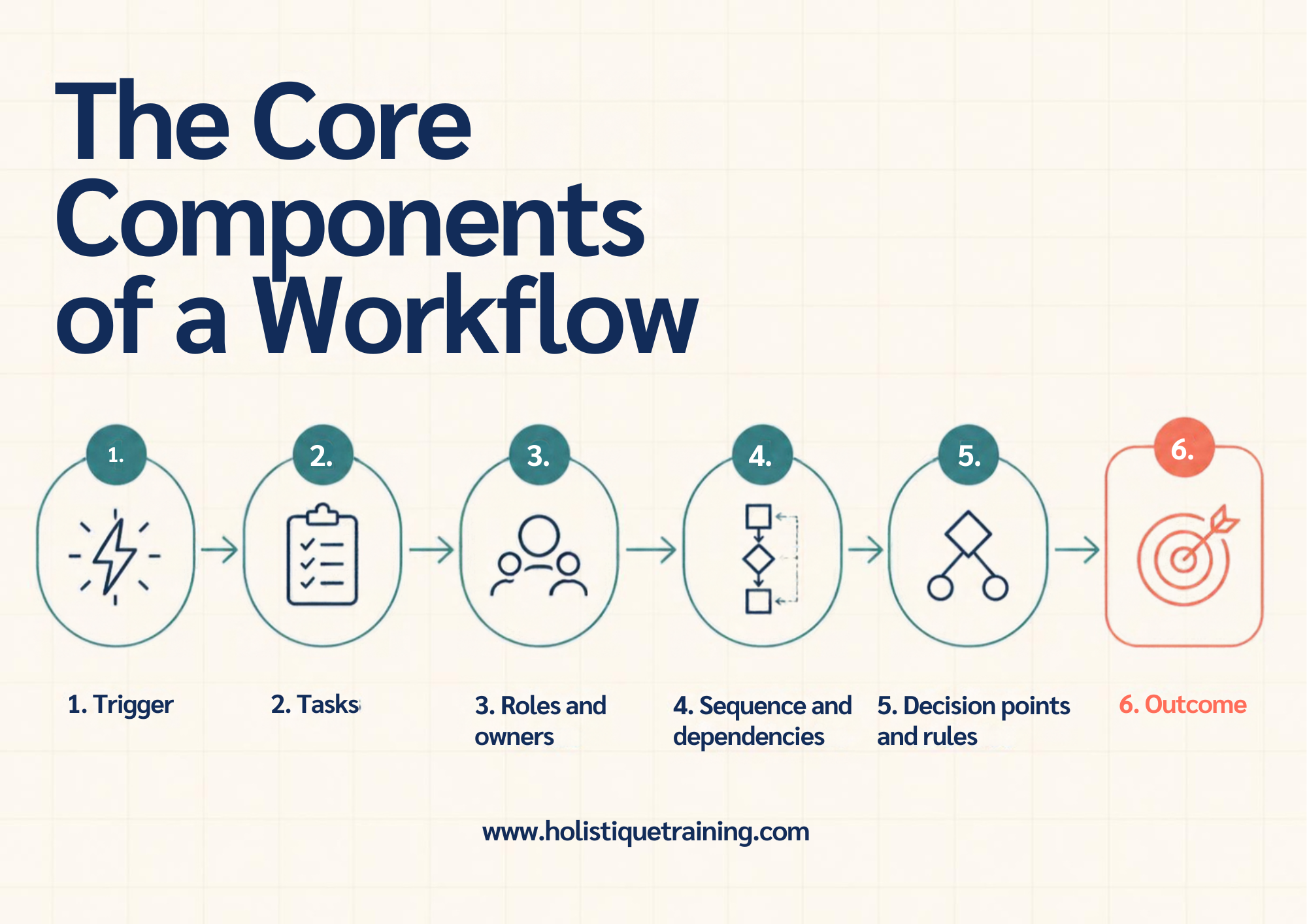
1- Trigger: The event that starts the workflow, such as a customer enquiry, an accepted job offer, or a supplier invoice arriving in a shared inbox.
2- Tasks: The individual actions to be completed, for example checking a document, entering data, or writing a reply. Each task should be small enough to assign to one person.
3- Roles and owners: The people, teams, or systems responsible for each task. A named owner for every step removes doubt about who should act next.
4- Sequence and dependencies: The order of tasks and which ones must finish first. An invoice, for instance, cannot be paid until the goods have been received and matched to the order.
5- Decision points and rules: The moments where the path splits according to a condition, such as an expense above a set value that needs senior approval while smaller claims are approved automatically.
6- Outcome:The finished result, such as a paid invoice, a hired employee, or a resolved complaint. A defined outcome shows whether the workflow is working.
2- Workflow vs Process vs Project
The words workflow, process, and project are often used as if they meant the same thing. They are related, but each describes a different level of how work is organised, and confusing them leads to poorly targeted improvement efforts.
Workflow and Business Process
A business process describes what an organisation does to reach an objective, such as recruiting staff or fulfilling orders. A workflow describes how that process is carried out in practice, including who acts, in what order, and with which tools. In short, the process is the what, and the workflow is the how.
Workflow and Project Management
A project has a defined start, a defined end, and a unique goal, such as opening a new office. A workflow is repeatable and continues for as long as the organisation needs it. Projects often create or redesign workflows, which then carry on as part of everyday operations.
Workflow and Standard Operating Procedures
A standard operating procedure is a written instruction explaining how to perform one task correctly. A workflow shows how many such tasks connect across people and departments. The procedure gives the detail, while the workflow shows the journey.
Concept | Main Focus | Repeatable? | Example |
|---|---|---|---|
Workflow | Sequence of steps and handovers | Yes | Approving a staff expense claim |
Business process | Overall activity that delivers an objective | Yes | Managing monthly payroll |
Project | One-off goal with a start and end date | No | Launching a new website |
Standard operating procedure | Detailed instruction for one task | Yes | Resetting a user password |
3- Types of Workflows
Workflows take several forms, and the right one depends on how predictable the work is and how many people are involved. Most organisations use a mixture of the following types.
1- Sequential workflows: Tasks follow a fixed order, and each step begins only when the previous one ends. Employee onboarding is a common example, where contracts are signed before equipment is ordered.
2- Parallel workflows: Several tasks run at the same time and come together at the end. A product launch may involve marketing, legal, and finance teams working simultaneously before final sign-off.
3- Rules-based workflows: The path changes according to conditions built into the workflow. A loan application, for example, may be routed to different reviewers depending on the amount requested.
4- Approval workflows: Work moves through a chain of authorisation before it can proceed, as with purchase orders, leave requests, and policy changes.
5- Ad hoc workflows: Steps are decided as the work unfolds, which suits creative or investigative tasks where the outcome cannot be fully predicted in advance.
Choosing the Right Type of Workflow
Sequential workflows suit stable, routine work, while parallel and rules-based workflows suit tasks with several contributors or variable conditions. Ad hoc workflows should be kept for genuinely unpredictable work, because the lack of structure makes them harder to measure and improve. Many organisations combine types, using a rules-based approval flow inside a wider sequential process.
Manual, Semi-Automated, and Automated Workflows
Workflows can also be described by how much technology they use. Manual workflows depend on people, paper, and email. Semi-automated workflows use software to route tasks and send reminders while people still make decisions. Fully automated workflows run without human intervention, which suits high-volume, rule-driven work such as matching invoices to purchase orders.
4- How to Create an Effective Workflow
Designing a workflow does not require specialist software. It requires a clear understanding of how work currently happens and a willingness to simplify it. The following steps offer a practical starting point.
1- Define the objective: State the outcome the workflow must deliver and how success will be measured, such as shorter invoice approval times or fewer errors.
2- Map the current steps: Speak to the people who do the work and record what actually happens, including workarounds. A simple flowchart or swimlane diagram is usually enough.
3- Identify problems: Look for delays, duplicated effort, unclear ownership, and steps that add no value. These are the places where improvement will have the greatest effect.
4- Redesign the sequence: Remove unnecessary steps, assign owners, set decision rules, and decide which tasks could run in parallel or be automated.
5- Test with a small group: Pilot the new workflow with one team before wider rollout, and correct problems while the cost of change is still low.
6- Document, train, and review: Write the workflow down, train the people involved, and schedule regular reviews so it keeps reflecting how the organisation operates.
Using Workflow Diagrams
A workflow diagram is a visual map of the steps in a workflow. Boxes show tasks, diamonds show decisions, and arrows show the direction of work. Swimlane diagrams add horizontal bands for each person or team, which makes handovers and delays easy to see. A diagram is often the quickest way to help colleagues agree on how work should flow, because everyone can point to the same step and discuss it. A whiteboard or a shared slide is enough for a first version.
Involving the People Who Do the Work
Involving the people who perform the tasks is the most important part of the exercise. They know where the real delays occur, and they are far more likely to follow a workflow they helped to design.
5- Benefits of Workflow
A well-designed workflow delivers value to employees, managers, and customers alike. The most important benefits are set out below.
Greater Efficiency and Time Savings
When every step is defined, employees spend less time deciding what to do next, searching for information, or waiting for approval. Tasks move faster because handovers are clear and reminders are built in. The time saved can be redirected to skilled work that genuinely needs human judgement.
According to Asana's Anatomy of Work Global Index 2023, knowledge workers spend 58 percent of their day on work about work, meaning coordination rather than the skilled, strategic tasks they were hired to do. The same report found that workers estimate they could save 4.9 hours each week if their processes were improved.
Consistency and Quality
A documented workflow ensures that a task is completed the same way every time, whoever performs it. This reduces errors, limits rework, and gives customers a predictable experience. It also makes training easier, because the correct method is already written down.

Explore the roles of Recording and Corresponding Secretaries. Learn how their collaboration ensures efficient communication and organisational success.
Accountability and Transparency
Because each step has an owner, managers can see where work is waiting and why. Bottlenecks become visible, and responsibility for delays is clear without blame. This supports fairer workloads and better planning.
Cost Control and Compliance
Fewer errors and less duplicated effort lower operating costs. Workflows also create an audit trail showing who approved what and when, which is valuable for regulated activities such as financial reporting, data protection, and health and safety.
Scalability and Business Continuity
A documented workflow can be repeated as an organisation grows, without depending on the memory of a few experienced individuals. If a key person is absent or leaves, colleagues can follow the written steps and keep work moving.
Better Employee Experience
Clear expectations and fewer interruptions reduce frustration and stress. Employees understand their role in the wider picture, which supports engagement and retention.
6- Workflow Examples Across Business Functions
Workflows exist in every department, often without being labelled as such. The following examples show how the concept applies in everyday business situations.
1- Employee onboarding (human resources):Once an offer is accepted, the workflow triggers right-to-work checks, contract signing, equipment orders, system access, and an induction plan. In the United Kingdom, employers must complete right-to-work checks before employment begins, so the workflow ensures this step cannot be skipped.
2- Invoice approval (finance):A supplier invoice is received, matched to the purchase order, and routed to the budget holder for approval. Approved invoices move to payment, while mismatches return to the buyer for correction.
3- Customer support ticket (customer service):An enquiry is logged, categorised, and assigned to an agent. If it is not resolved within an agreed time, it is escalated to a senior colleague, and the customer is notified when it closes.
4- Content publishing (marketing):A brief is written, a draft produced, and the piece reviewed by an editor and, where needed, by legal or brand teams. After approval it is scheduled, published, and measured.
5- Purchase order (procurement):An employee raises a request, the manager approves it, and the buyer selects a supplier. Payment is released only when the delivery matches the order.
6- Data subject access request (compliance):Under UK GDPR, organisations generally have one month to respond to a request for personal data. A workflow logs the request, verifies identity, gathers records, and issues the response before the deadline.
The "Human Resources Lifecycle Training: Mastering the Employee Journey" course provides a comprehensive understanding of the HR lifecycle and its critical role in shaping organisational success. Covering every stage of the employee experience—from recruitment to offboarding—this training equips HR professionals with the knowledge and tools
Workflows in Non-Profit and Public Sector Organisations
Workflows matter just as much outside the commercial sector. Charities, public bodies, and humanitarian organisations rely on them for grant approvals, beneficiary registration, procurement, and reporting to funders. A clear workflow protects accountability, because every decision can be traced and every rule shown to have been followed.
7- Workflow Automation
What Is Workflow Automation?
Workflow automation uses software to carry out tasks, route information, and trigger actions according to predefined rules, with little or no human involvement. A typical automated workflow begins with a trigger, such as a form submission, applies conditions, such as checking a value against a limit, and then performs actions, such as sending a notification or updating a record.
Where Automation Works Best
Automation delivers the greatest return on tasks that are frequent, rule-based, and prone to human error, such as data entry, document routing, reminders, and status updates. Tasks that depend on empathy, negotiation, or complex judgement are better left to people, supported by automation where it saves time.
McKinsey Global Institute research found that about half of the activities people are paid to do globally could theoretically be automated with currently demonstrated technologies. The research also found that fewer than 5 percent of occupations consist of activities that can be fully automated, so automation usually changes tasks within a job rather than replacing the job itself.
Feature | Manual Workflow | Automated Workflow |
|---|---|---|
Speed | Depends on individual availability | Runs as soon as it is triggered |
Accuracy | Prone to typing and copying errors | Consistent when the rules are correct |
Cost pattern | Low set-up cost, high ongoing labour | Higher set-up cost, lower ongoing labour |
Flexibility | Easy to adapt on the spot | Requires configuration changes |
Audit trail | Often incomplete | Recorded automatically |
Best suited to | Complex, unusual, or sensitive work | High-volume, repetitive, rule-based work |
Risks to Manage
Automating a poor workflow simply produces poor results faster, so teams should fix the process first and automate second. Sensitive data also needs protection, so access controls and data protection requirements should be built in from the start.
8- Workflow Management Tools and Software
Workflow tools help teams design, run, and monitor their workflows in one place. The right choice depends on the size of the organisation and the complexity of its work. The main categories are as follows.
1- Task and project management platforms:Tools that assign tasks, set deadlines, and show progress on shared boards, which suit team-level workflows.
2- Business process management suites: Systems that model, run, and analyse complex processes across departments, often with dashboards and reporting.
3- Robotic process automation: Software robots that copy data, complete forms, and move information between systems that do not otherwise connect.
4- Document and e-signature tools: Services that route contracts and policies for review and signature while keeping a secure record.
5- Integration platforms: Services that connect existing applications so that an action in one system triggers a response in another.
Key Criteria for Choosing a Workflow Tool
When comparing tools, the following questions are worth asking.
6- Ease of use: Can non-technical staff build and adjust workflows without constant support?
7- Integration: Does it connect with the email, finance, and HR systems already in use?
8- Security and compliance: Does it protect personal data and meet regulations such as UK GDPR?
9- Reporting: Does it show cycle times, bottlenecks, and workload clearly?
10- Cost and support: Is the total cost, including training, justified by the expected savings?
Before buying any tool, map the workflow first and list what it must achieve. Software should support a well-understood process, not compensate for an unclear one. A pilot with a small team will show whether the tool fits real working habits.

Learn how Business Process Management boosts efficiency. Explore top BPM certifications for 2024 covering strategy, improvement, and process excellence.
9- Common Workflow Challenges and How to Overcome Them
Even carefully designed workflows can fail if common problems are ignored. The table below summarises the most frequent challenges and practical responses.
Challenge | Warning Sign | Practical Response |
|---|---|---|
Bottlenecks | Work regularly waits for one person or team | Redistribute tasks, add backup approvers, or automate the step |
Unclear ownership | Nobody knows who acts next | Assign a named owner to every step |
Resistance to change | Staff keep using old methods | Involve users in the design and explain the benefits |
Over-complication | Too many steps and approvals | Remove steps that do not add value |
Tool overload | Information is scattered across many apps | Consolidate tools and agree where work is recorded |
No measurement | Nobody can say whether the workflow works | Track time, error rates, and satisfaction |
Resistance to change is often the most underestimated challenge. People may distrust a new workflow if they feel it was imposed without explanation or if it makes their own tasks harder. Clear communication about the reasons for change, early involvement of users, and visible support from managers all help new ways of working to take hold.
Measurement also deserves particular attention. Useful indicators include cycle time, which is how long a workflow takes from trigger to outcome, error rates, the number of tasks waiting at each stage, and user satisfaction. Tracking these figures over time shows whether changes are working and where the next improvement should focus.

The best quality management strategies encompass a multifaceted approach aimed at consistently delivering superior products or services that meet or exceed customer expectations. At its core, these strategies emphasise a commitment to continuous improvement, fostering a culture of quality throughout the organisation. Adopting international standards
10- Best Practices for Optimising Workflows
Start with the Outcome
Begin with what the customer or colleague needs at the end, then work backwards. Every step should contribute to that result, and any step that does not should be questioned.
Simplify Before You Automate
Remove unnecessary approvals, duplicated data entry, and unclear handovers first. Automation should support a lean workflow, not preserve a cluttered one.
Standardise, but Allow for Exceptions
A workflow should handle the normal case efficiently while providing a clear route for exceptions, so that unusual situations do not force people to abandon the process.
Measure What Matters
Choose a small number of indicators linked to the workflow's objective, such as cycle time or error rate, and review them regularly. Too many measures create noise, while too few leave problems hidden.
Review Regularly
Organisations change, and workflows must change with them. A scheduled review each quarter or year keeps the design aligned with current priorities, regulations, and technology.

This advanced training course provides a comprehensive framework for achieving and sustaining operational excellence within organisations. Participants will explore strategies to optimise processes, enhance performance, and build a culture of continuous improvement. By blending theory with real-world applications, the course equips leaders and managers with the tools to
11- The Future of Workflow
Artificial intelligence is changing how workflows are built and run. Software can now read documents, summarise requests, suggest next steps, and complete routine tasks on behalf of employees. Hybrid working has also raised the importance of clear, shared workflows, because teams can no longer rely on quick conversations across a desk to keep work moving.
According to McKinsey's Global Survey on AI, published in March 2025, redesigning workflows had the biggest effect on an organisation's ability to see financial impact from generative AI, out of 25 attributes tested. The survey also found that 21 percent of respondents using generative AI had fundamentally redesigned at least some workflows.
The lesson is straightforward. Technology delivers value only when the workflow around it is well designed, so organisations that understand their workflows will be best placed to benefit.
12- Conclusion
A workflow is the visible path that work follows from trigger to outcome. When that path is clear, tasks are completed faster, errors fall, and people know what is expected of them. Whether an organisation is approving invoices, onboarding staff, or answering customers, the same principles apply: define the steps, name the owners, set the rules, and measure the results.
The most practical way to begin is to choose one workflow that causes frustration, map it with the people who use it, remove the obvious waste, and only then consider automation. Workflow is not a technical detail. It is a management discipline that shapes efficiency, quality, and the everyday experience of work, and it will only grow in importance as technology advances.